Pregnancy Tracker: Baby Growth
- 5.0
- Rating
- 10.00K
- Installs
- Free
- Price

 Analysis by App-foxy
Pregnancy apps can be comforting, but they also ask me to place very personal information in a phone. That makes trust just as important as attractive weekly illustrations or a polished timeline. After spending time with Pregnancy Tracker: Baby Growth, I see it as a focused parenting app from WorkerBee App for people who want a simple way to follow pregnancy progress and look at how the baby develops over time.
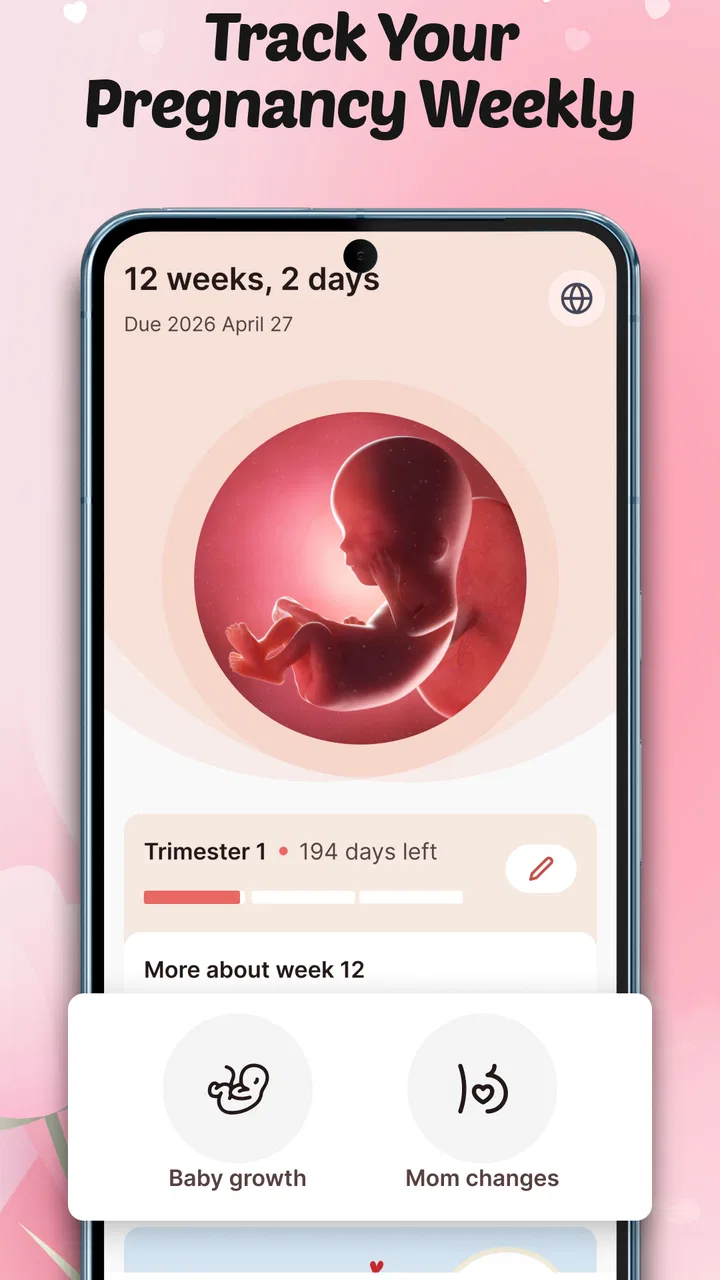
The basic idea is easy to understand: enter the pregnancy journey, return each week, and use the app as a visual reference for what is happening. I like that narrow purpose because it avoids turning a pregnancy tracker into a crowded health dashboard. At the same time, anyone considering it should remember that a tracking app is a companion, not a substitute for a midwife, doctor, scan, or urgent medical advice.
My main takeaway is that the app is most useful when you treat it as a private reference tool rather than an authority on your pregnancy. That distinction matters. Pregnancy does not always follow a neat calendar, and a general growth guide cannot account for every personal medical detail. Used with that expectation, the app can make weekly check-ins feel more understandable without pretending to replace professional care.
You May Also Like

 Pandora - Music & Podcasts
Pandora’s Music Is Easy to Start, but Harder to Recover
Pandora’s strength is its low-effort path from a seed to a station. Its weak spot is how much confidence it asks you to place in connection, setup, and quiet recovery.

 AccuWeather: Weather Radar
AccuWeather Review: A Quick, Clear Forecast for Everyday Decisions
For everyday plans, the best forecast is the one you can understand quickly. AccuWeather makes rain timing, radar, and local conditions easy to act on, with a few trade-offs.

 Hill Climb Racing
Why Hill Climb Racing Still Turns Crashes Into One More Run
A tiny car, a bumpy hill and one more upgrade: Hill Climb Racing keeps resurfacing because its simple chaos makes every near-miss feel personal.

 AliExpress - Shopping App
AliExpress Makes Global Shopping Feel Personal, but Shoppers Bear the Risk
AliExpress turns a global marketplace into a pocket-sized discovery engine. Its reach is useful, its shopping loop compelling, and its trade-offs easy to miss.

 Lords Mobile: Kingdom Wars
Lords Mobile Is a Kingdom-Building Routine, Not a Quick Match
A case-by-case verdict on the building, battles, device demands, and social commitments that make Lords Mobile rewarding for some players and exhausting for others.

 PDF Scanner app - TapScanner
TapScanner Makes Paperwork Easier to Capture, Check, and Share
TapScanner makes scanning with a phone feel less like a rescue operation and more like a dependable step in getting work done. Its capture tools are useful, though not flawless.
More From Our News Desk
View All News


What the app feels like in everyday use
The strongest part of the experience is its week-by-week focus. Instead of asking me to search through broad parenting articles, it gives the pregnancy timeline a clear rhythm: open the app, see the current stage, and spend a few minutes learning what that stage is intended to represent. For a first-time parent, that structure can make an otherwise overwhelming subject feel more manageable.
I can imagine using it on a quiet Sunday evening. A couple might sit together after dinner, open the current week, and use the baby-growth information as a starting point for conversation. One person may be curious about development, while the other simply wants a visual reminder of how far along the pregnancy has progressed. That is a realistic role for this app: a small shared ritual, not a replacement for a medical appointment.
The app is free to install, which lowers the barrier for someone who wants to try it before deciding whether it belongs in their routine. It also includes in-app purchases ranging from a few dollars to around twenty-one dollars per item. I would therefore approach the free experience first and make sure the core weekly information is genuinely useful before paying for anything extra. The presence of purchases is not automatically a problem, but it means the value decision should be made slowly, especially when another pregnancy calendar may cover the basics without additional spending.
Its content rating is Everyone, so the presentation is intended to be suitable for a broad audience. That makes sense for a pregnancy reference app that may be opened by partners, relatives, or older children who are curious about the baby. Still, an all-ages rating says more about presentation than medical depth. I would not read it as a promise that every explanation will be detailed enough for a specialist question.
Why the weekly format works
A weekly structure gives me a practical reason to return without demanding constant attention. Pregnancy information can become stressful when an app sends me into endless lists of symptoms, checklists, and warnings. A focused growth view is calmer. It encourages short visits and makes it easier to compare the current stage with earlier moments in the journey.
There is also a useful emotional advantage. People often want a sense of progress between appointments, when several days can feel long. Seeing the timeline move forward can provide reassurance and help a partner feel involved. That reassurance should remain emotional rather than diagnostic, but it is still valuable. The app can help turn an abstract number of weeks into something easier to picture.
My advice is to use the weekly screen as a conversation prompt. If something catches your attention, write down the question and take it to your healthcare professional instead of trying to solve it through repeated searches inside the app. This workflow keeps the app in its proper role and prevents an interesting development note from becoming an unnecessary source of worry.
Where it differs from broader pregnancy apps
The usual alternatives in this category often try to do everything at once: symptom logs, appointment reminders, contraction timers, food guidance, community discussions, birth preparation, and daily notifications. That can be helpful for someone building a complete pregnancy-management system, but it can also create noise. Pregnancy Tracker: Baby Growth is more appealing to me if the main goal is understanding the baby’s development week by week.
The trade-off is clear. A specialist tracker may feel less cluttered than an all-in-one app, but it may not become the single place where a user manages appointments or records symptoms. If you want a detailed personal health diary, a calendar shared with a partner, or tools for labor, I would look at a more comprehensive option. If those extras usually make you stop using an app, the narrower approach here may be a better fit.
This difference also affects notification habits. A broad app may push frequent reminders to keep me engaged, while a focused weekly tool can be checked when I choose. I prefer that kind of self-directed routine for sensitive information. However, users who rely on reminders to remember appointments or supplements should not assume that a growth-focused app will cover those needs.
Trust starts with what I choose to enter
Pregnancy information is sensitive even when it seems ordinary. A due-date estimate, week of pregnancy, symptoms, or notes about appointments can reveal intimate details about a person’s health and family life. My practical rule is to enter only what is needed for the experience I actually want. If I am using the app mainly to view general development, I would avoid adding extra personal notes unless they clearly improve the routine.
I would also review the app’s permission prompts carefully during setup and later in the phone’s settings. I do not treat a request as harmless simply because it comes from a parenting app. A permission should make sense for the action I am trying to perform. If a request appears unrelated to viewing pregnancy information, I would pause and decide whether the feature is worth granting that access.
The same caution applies to account controls. Before building a long-term record, I would look for visible ways to manage an account, remove entries, or stop using the service cleanly. Those controls matter more to me than a decorative theme. If I cannot quickly understand how my information is handled or how to leave, I would keep my use minimal and avoid storing anything beyond the basics.
That is not a criticism aimed specifically at WorkerBee App; it is sensible behavior for any app dealing with pregnancy. A friendly interface can make an app feel trustworthy, but the real test is whether the user can make informed choices. I want clear prompts, understandable settings, and no pressure to share more than necessary.
Important moments for privacy awareness
The most data-sensitive moment is usually the first setup. This is when an app may ask for dates or personal details to place the user on a timeline. I would read each screen rather than tapping through automatically. If the app offers optional fields, I would leave them blank until I understand why they are useful.
A second sensitive moment comes when sharing the phone with a partner or family member. A pregnancy tracker may appear on the home screen, in recent apps, or through notifications. If privacy around the pregnancy matters, I would check what appears in notifications and whether the device has a lock screen. This is a small practical step, but it prevents accidental disclosure in a workplace or shared household.
A third moment is changing phones or stopping the app. I would not assume that deleting an app automatically removes every associated record. Before uninstalling, I would inspect the settings and any account area that the app presents. If I were moving to another tracker, I would manually save only the information I truly need, rather than recreating a complete history out of habit.
These steps may sound cautious, but pregnancy is exactly the kind of subject where control should remain with the user. The best app experience is not just informative; it also lets me decide how much of my personal life becomes part of the product.
How I would use it without overrelying on it
I would begin by setting up the timeline carefully and checking that the current week makes sense. I would then return once a week, preferably at a consistent time, and read the growth information without treating it as a prediction of exactly what my baby must be doing. Every pregnancy is different, and a general guide cannot measure an individual baby’s health.
For a partner, I would use the app as a shared learning aid. Instead of forwarding every detail, I would choose one or two interesting points from the current week and discuss them together. That keeps the experience positive and avoids turning the app into a constant stream of unsolicited advice for the pregnant person.
For someone prone to health anxiety, I would set a boundary: one planned check-in, no repeated searching after a worrying thought, and professional advice for symptoms or concerns. The weekly format can support that boundary because it naturally encourages occasional use. But if reading growth information increases anxiety rather than reducing it, stopping is a reasonable choice.
For a user who wants to prepare for appointments, I would keep a separate note with questions for the healthcare team. The app can inspire those questions, but I would not depend on it to preserve a medical history or organize clinical decisions unless its controls clearly meet that need for me.
Performance expectations and practical friction
The current version is 1.0.7, and the app requires Android 9 or later. That makes compatibility an important first check for people using an older phone. On a supported device, I would expect the main experience to be straightforward, but I would still keep the app updated through the normal store process because pregnancy information is personal and software maintenance matters.
One possible friction point is the gap between a simple store promise and a user’s expectations. “Baby growth” can mean visual comparisons, detailed developmental explanations, medical measurements, or personalized guidance. I would not assume that the app provides all of those simply because it follows the pregnancy week by week. Before paying for an optional item, I would confirm exactly what it adds and whether it changes my day-to-day use.
Another limitation is that a weekly view can feel too general for experienced parents who already know what they want to track. Someone looking for kick counts, appointment management, medication reminders, or a detailed symptom journal may quickly outgrow this focused format. That is not a failure; it is a sign that the app is better suited to orientation and reflection than comprehensive pregnancy administration.
The app’s published audience response is encouraging, with a five-star average from around two hundred eighty ratings and over ten thousand installs. I see that as a useful sign that people are finding value in it, but not as proof that it will suit every pregnancy or every privacy preference. A small, focused app can satisfy one group very well while leaving another group wanting more controls.
Who should try it, and who should look elsewhere
I would recommend giving it a chance if you want a free starting point, prefer a calm weekly routine, and mainly care about seeing how pregnancy progresses. It should also appeal to partners who want an accessible way to understand the current stage without reading a large library of parenting material.
I would be more cautious if you expect a full medical companion. People who need detailed logs, clinical reminders, extensive personalization, or a strong export and account-management workflow should compare it with broader alternatives before settling in. The same applies to anyone who wants a community or direct professional support; a growth-focused app is unlikely to replace those services.
I would also skip it if the available privacy controls do not give you enough confidence. No weekly illustration is worth sharing information you do not want stored or displayed. Start with the smallest amount of personal data, inspect the permissions and settings, and only continue if the choices feel understandable.
My cautious verdict
Pregnancy Tracker: Baby Growth has a clear identity. It is a free parenting app from WorkerBee App that makes weekly baby development the center of the experience, rather than trying to become an entire pregnancy-management platform. I appreciate that focus because it can make the journey easier to follow and easier to discuss with a partner.
Its strongest use is as a short, repeatable reference: open it once a week, learn something relevant to the current stage, and carry questions to a qualified healthcare professional. Its weaknesses come from the same simplicity. Users wanting extensive tracking, reminders, or deeper personal controls may need another tool alongside it or instead of it.
I would start with the free version, enter only essential information, review every permission and account option carefully, and wait before making any in-app purchase. If the weekly growth view becomes a helpful part of your routine and the app’s controls feel comfortable, it is an easy recommendation for that specific purpose. If you need medical management or a detailed private record, choose a more specialized alternative. For me, the right reason to use it is gentle weekly orientation, not medical certainty.
FAQs for Pregnancy Tracker: Baby Growth
01What features does the Pregnancy Tracker: Baby Growth app offer?
The Pregnancy Tracker: Baby Growth app provides a comprehensive suite of features including weekly updates on your baby's development, personalized health tips, a kick counter, contraction timer, and a diary to record your journey. It also offers nutrition advice and connects you with a community of fellow expectant parents.
02Is the Pregnancy Tracker app free to use?
The app offers a free version with essential features. However, for an enhanced experience, users can opt for a premium subscription. The premium version unlocks additional features such as personalized content, ad-free usage, and exclusive expert advice. Be sure to check the in-app purchase options for the latest pricing details.
03How accurate is the information provided in the app?
The Pregnancy Tracker app collaborates with healthcare professionals to ensure the accuracy of its content. It provides medically reviewed information and updates tailored to your pregnancy stage. However, it is always advisable to consult your healthcare provider for personalized medical advice and to verify any health-related concerns.
04Can I track multiple pregnancies with this app?
Yes, the Pregnancy Tracker app allows users to manage and track multiple pregnancies simultaneously. You can easily switch between different profiles to monitor each pregnancy's progress. This feature is particularly useful for parents expecting twins or managing past pregnancy records alongside the current one.
05Is my personal data safe with Pregnancy Tracker: Baby Growth?
Yes, the app prioritizes user privacy and security. It uses encryption and secure servers to protect your personal information. Additionally, the app complies with data protection regulations, ensuring that your data is not shared with third parties without your consent. Always review the app's privacy policy for specific details.
Pros
- Comprehensive weekly updates on baby growth.
- Easy-to-use interface for new users.
- Offers personalized health tips.
- Includes a contraction timer feature.
- Connects with a supportive community.
Cons
- Limited customization for notifications.
- Some features require a paid subscription.
- Occasional ads disrupt user experience.
- Lacks offline functionality.
- No integration with other health apps.

Pregnancy Tracker: Baby Growth
Gallery